بِسْمِ اللَّهِ الرَّحْمَنِ الرَّحِيمِ , الْحَمْدُ لِلَّهِ رَبِّ الْعَالَمِينَ , الرَّحْمَنِ الرَّحِيمِ , مَالِكِ يَوْمِ الدِّينِ , إِيَّاكَ نَعْبُدُ وَإِيَّاكَ نَسْتَعِينُ , اهْدِنَا الصِّرَاطَ المُسْتَقِيمَ , صِرَاطَ الَّذِينَ أَنْعَمْتَ عَلَيْهِمْ , غَيْرِ المَغْضُوبِ عَلَيْهِمْ وَلاَ الضَّالِّينَ.
Assalamualaikum w.b.t/السَّلاَمُ عَلَيْكُمْ وَرَحْمَةُ اللهِ وَبَرَكَاتُه
- Burn DVD from An ISO Image.
You have backed up a DVD to your hard drive in ISO format. Now, you want to burn a DVD from that image. This post illustrates how, first using the command line, then the GUI.
COMMAND LINE
Insert the DVD disc, and issue one of the following commands to burn a disc.
- growisofsTo install growisofs,
$ sudo apt-get update
$ sudo apt-get install growisofs
To burn DVD,
$ growisofs -dvd-compat -Z /dev/dvd=/home/peter/my.iso - wodimTo install wodim,
$ sudo apt-get update
$ sudo apt-get install wodim
Burn a disc like this:
$ sudo wodim -v dev=/dev/dvd speed=4 -dao -eject -data /home/peter/my.iso
GUI
The GUI favorites are:
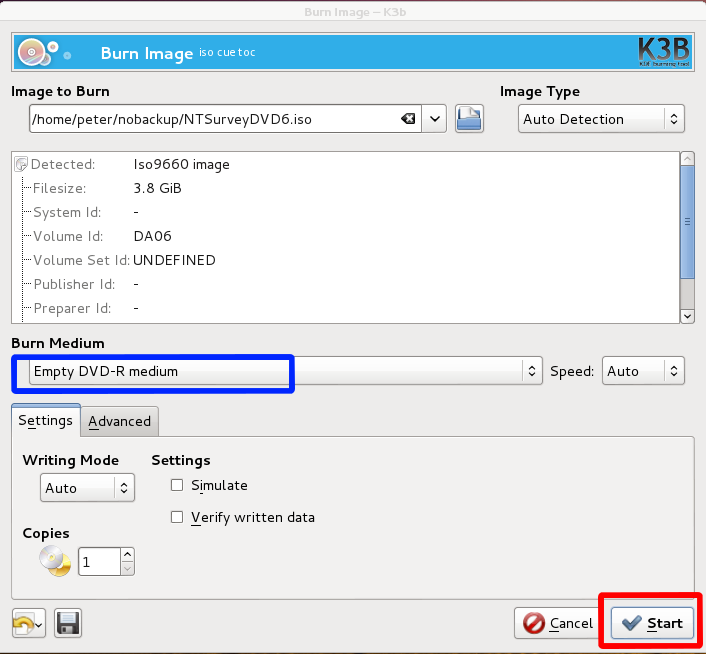
Below are the K3b-specific instructions to burn an ISO image on a DVD.
- Run K3b.

- Select Burn Image in the Tools menu.

- Specify the location of the ISO image file.
- Insert a blank DVD disc.
- The Burn Medium field is updated to indicate the detected empty disc.

- Click Start.

- Sumber: (http://linuxcommando.blogspot.com/2014/04/burn-dvd-from-iso-image.html)
- Blogger Home.
- s3v3ns3v3ncopyright©
- growisofsTo install growisofs,


Tiada ulasan:
Catat Ulasan
Bismillahirrohmanirrohim.
Bila berkata...
Bila berhujah...
Bila memberi pendapat...
Bila bercerita...
Sama ada secara lisan atau bertulis dan Hindarilah dari membuka aib diri sendiri dan orang lain serta nilai tambahnya Jauhilah diri dari mencela diri sendiri dan mencelakakan orang lain
Jangan kedekut.
Maksudnya jangan sesekali kedekut untuk berbuat baik kepada diri sendiri.
Aamiin Ya Allah Ya Rohman Ya Rohim Ya Rob...
Wassalamu.